
Stash TV
A TikTok-like vertical scroller interface for Stash. Forked from Stash Reels.
semantic-release-botNo reviewer has approved this plugin yet. Read the source before installing, or review it for the community.
sha256 865e86388a5c851600a793040443ae7fac5609e62c2f8524295c77b99c7fddb5
- Last updated
Oct 10, 2026- First created
- Version
2.34.0- Package id
stash-tv- Commits
- 108
- Repo stars
- 7
README
Stash Plugins
This repository contains plugins for Stash.
Installing
Plugins can be installed and managed from the Settings > Plugins page.
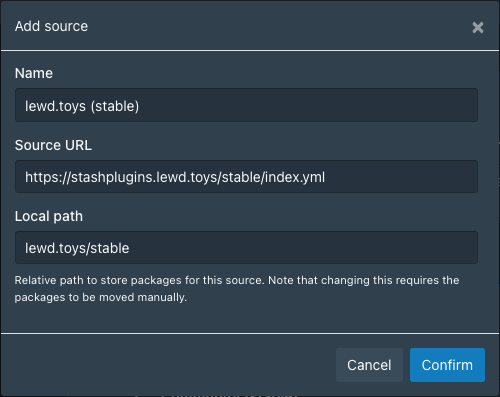
Plugins are installed using the Available Plugins section. First this repo must be added as a source. To do so click Add Source and enter the following details:
Name:
lewd.toys (stable)
Source URL:
https://stashplugins.lewd.toys/stable/index.yml
Local Path:
lewd.toys/stable
Like this:
Plugins can then be installed from the new lewd.toys (stable) section.
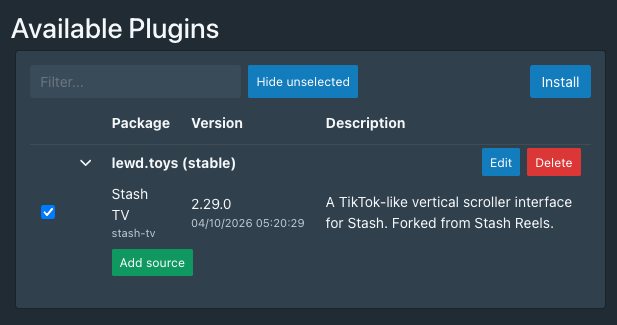
Once installed plugins can be updated or uninstalled from the Installed Plugins section.
Installing manually
By default, Stash looks for plugin configurations in the plugins sub-directory of the directory where the stash config.yml is read. This will either be the %USERPROFILE%\.stash\plugins on Windows or /root/.stash/plugins on Unix systems (Mac, Linux, etc.) or the current working directory.
Plugins are added by adding configuration yaml files (format: pluginName.yml) to the plugins directory.
Loaded plugins can be viewed in the Settings > Plugins page. After plugins are added, removed or edited while Stash is running, they can be reloaded by clicking Reload plugins button.